
See How Our Own AI Readiness Assessment Workflow Operates in Practice
Real-world business operations are rarely neat. Documents arrive in different formats - PDF, Word, Markdown, or even handwritten scans - sometimes only part of a document is returned, and submissions often come in through different channels or from a colleague's email address. Here's how our automation technology handles all of that to produce a consistently high-quality result that's independently verified, backed by a clear audit trail, and kept under 100% human oversight.
Putting Our Own Technology to Work Every Day
When we talk about controlled workflow automation with independent verification and 100% human sign-off, you don't have to take our word for it. Our own AI Readiness & Business Benefit Assessment runs on the exact same software, governance controls, human review screen, and CRM integration that we build and deploy for our clients.
To show you how this works in practice, let's follow a typical, slightly messy real-world submission — from the moment a scanned PDF arrives by email to the moment the approved Executive Scorecard lands in the client's inbox. The infographic below is a simplified view of our real operational workflows for illustration.
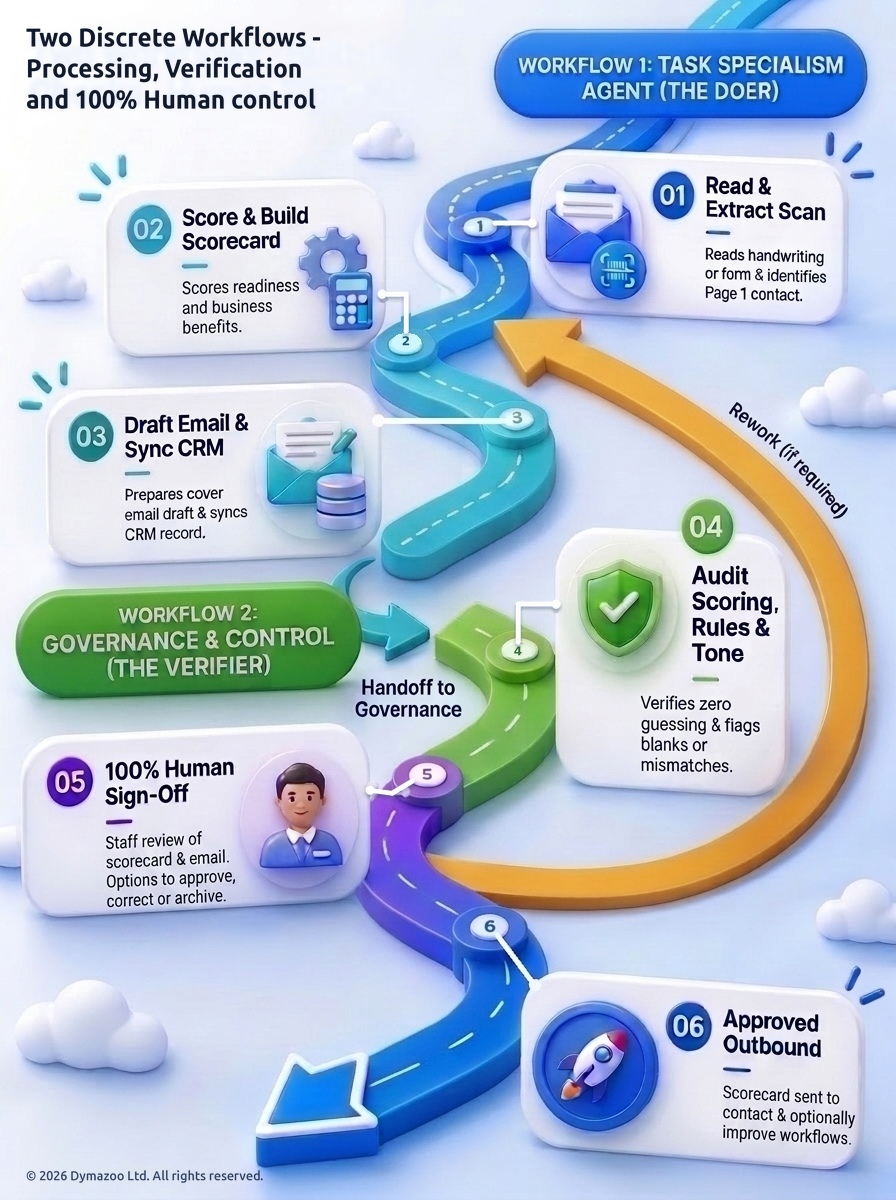
The Real-World Scenario: A Handwritten Questionnaire Is Submitted by Email
Imagine John Smith (CTO at a fictional firm, My Company Ltd) prints out our assessment pack to fill in by hand between meetings:
- check_circleOnly Two Pages Returned: Rather than scanning all 12 pages of the pack, he only scans Page 1 (his organisation and contact details) and Page 12 (the one-page Response Summary Grid).
- check_circleHandwriting & Human Quirks: The handwriting is legible but has normal variations and one question is left completely blank by accident, which the online form would have validated for the user.
- check_circleSent From Someone Else's Email Address: John hands the pages to a colleague (or uses a personal email address) to scan and email to
assessment@dymazoo.com— so the person who sent the email isn't the business contact named on the form.
Step-by-Step: How Our Two Discrete Workflows Process the Submission
Workflow 1: Task Specialism Agent — The Doer
- check_circleStep 01 — Read & Extract Scan: As soon as the email arrives at
assessment@dymazoo.com, it's routed to our specialist assessment workflow. It reads the scanned handwriting across Page 1 and the Summary Grid, recognises that John Smith on Page 1 is the real business contact (while logging who sent the email in the audit trail), and checks that every question has been answered. When a full questionnaire is returned, it also cross-checks the individual question pages against the Summary Grid at the back — so if someone tickedBnext to the full question on Page 3 but accidentally wroteCin the summary table at the back, it scores using the detailed question answer, but flags the discrepancy so nothing is lost. - check_circleStep 02 — Score & Build Scorecard: Rather than asking an AI chatbot to guess a score, consistent calculation rules work out the exact section scores, estimate the business readiness and recoverable team capacity (£/year), and build the A4-printable Executive Scorecard — putting the headline business benefits, matrix position, and any unverified or unanswered areas straight onto Page 1 for busy executives.
- check_circleStep 03 — Draft Email & Sync CRM: Prepares the tailored cover email addressed to John Smith and creates or updates the organisation, contact, and opportunity record in our CRM, before handing the completed package over to Governance.
Workflow 2: Governance & Control — The Verifier
- check_circleStep 04 — Audit Scoring, Rules & Tone: Before anything goes out to a client, the package passes to Dymazoo Governance and Control — a separate, independent verification workflow. It checks that no missing figures have been guessed or invented, confirms that any blank, unverified, or mismatched answers are clearly flagged, reviews the Scorecard and cover email against our quality and tone rules, and replaces any earlier draft if the item has been reworked.
- check_circleStep 05 — 100% Human Sign-Off: A member of our team opens the review screen and sees everything in one place: the original handwritten PDF scan side-by-side with the extracted answers and confidence score, any exception warnings, the formatted Executive Scorecard, the CRM record, and the draft cover email. Our reviewer can approve it for immediate dispatch, correct and return it for rework (sending it back along the rework loop to Step 02 to recalculate and re-check), or archive it.
- check_circleStep 06 — Approved Outbound: Once approved, the Executive Scorecard and cover email go straight to John Smith (
jsmith@mycompany.co.uk), and any new quirk spotted during review can optionally be added to our test library to make the workflows even better next time.
Built for Real-World Exceptions — Not Just Clean Demo Inputs
In day-to-day business, people don't always follow the script: they leave boxes blank, write notes in the margins, contradict themselves between pages, or send documents from personal or colleague email addresses.
| Real-World Exception | Working with a typical Chatbot or Static Script | Dymazoo Governed Workflow |
|---|---|---|
| Missing or Blank Answers (e.g. a question left empty, or headcount omitted) | Silently invents a default number or crashes. | Marks the question as blank or to be confirmed, highlights it in the summary table, and alerts the reviewer — zero guessing. |
| Mismatch Between Detailed Pages & Summary Grid | Takes whichever page it read last without noticing the contradiction. | Cross-checks both sections automatically, scores using the detailed question answer (where the person read the full options), and flags the discrepancy so nothing is lost. |
| Emailed by an Assistant or Personal Address | Replies to the wrong person or overwrites the decision-maker's CRM record. | Picks up the named contact from Page 1 of the document as the primary recipient while logging who sent the email in the audit trail. |
| Varied Handwriting & Multi-Format Uploads | Fails on non-digital PDFs or inconsistent handwriting. | Reads handwritten scans, digital PDFs, Word (.docx), Markdown, and online forms, showing the original file beside the extracted answers for a quick visual check. |
The Continuous Learning Loop: How Every Exception Makes the System Smarter
What you see above is our live operational workflow — and it keeps getting smarter through a practical Learning Loop (putting Question 15 of our own assessment into everyday use):
- 1Spot the New Exception in Human Review: Because every submission goes through our human review screen, if someone sends in a format or edge case our current rules don't handle cleanly, our reviewer spots it straight away — before any email goes out.
- 2Update the Workflow: We refine the extraction, scoring, or governance rules to handle that new case.
- 3Replay Our Saved Library of Multi-Format Test Cases: Before putting the change live, we run it against our saved library of test submissions — covering (a) clean full completions, (b) incomplete scans sent from a colleague's email address, and (c) questionnaires with mismatches between the detailed pages and the summary grid — to prove that the updated workflow handles the new case and performs at least as well as the previous version across every existing test.
- 4Handled Automatically Next Time: Once we've confirmed nothing else has been broken, the update goes live — so the next time that situation comes up, the workflow handles it automatically.
Try the Live Workflow Yourself
The best way to see how we build governed operational workflows is to try ours first-hand:
- check_circleTake the AI Readiness & Business Benefit Assessment: Complete the 60-second Summary Grid online, or download the printable PDF/Word pack, fill it in by hand, and email it to
assessment@dymazoo.com.